FIELD REPORT 001
Published March 27, 2026 | Damisi Harris | AI Tools
The Short Version
I typed one sentence. An AI agent built me a branded video, hit an error, fixed the error by itself, verified it worked by opening a browser and taking a screenshot, and handed me a finished MP4 file. I did not write a single line of code. The tool is called Google Antigravity and it is completely free. Here is everything you need to know.
What Is Google Antigravity?
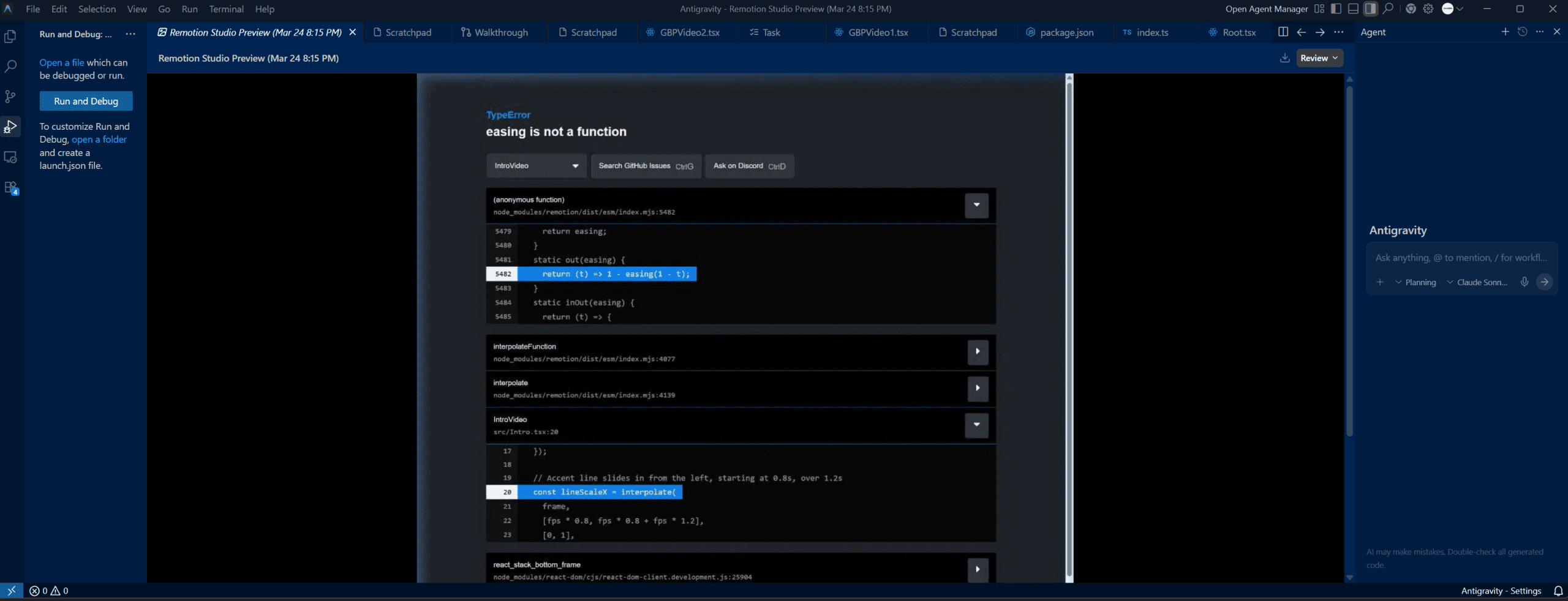
Google Antigravity is an IDE, which stands for Integrated Development Environment. Think of it as a smarter version of a text editor where you write and run code. But Antigravity is not your typical IDE. It was built specifically for AI agents, not for humans typing code line by line.
Google released it in November 2025 alongside their Gemini 3 model. The core idea is simple: instead of you writing code to build something, you describe what you want in plain English and an AI agent builds it for you. The agent plans the task, writes the code, executes it, tests it, and fixes any errors. All without you touching a single line.
It runs on Windows, Mac, and Linux. It is powered by Gemini 3 Pro by default but also supports Claude and GPT. And as of today, it is completely free during public preview.
QUICK FACTS
→ Released: November 2025
→ Cost: Free during public preview
→ Models: Gemini 3 Pro, Claude Sonnet 4.6, Claude Opus 4.6, GPT-OSS
→ Works on: Windows, Mac, Linux
→ Built on: A fork of VS Code
→ Best for: Building things with AI agents without writing code manually
What Makes It Different From Other AI Tools?
Most AI tools you have used are chat interfaces. You type a question, the AI responds with text. Maybe it writes some code for you and you copy it somewhere. That is helpful but it is still YOU doing most of the work.
Antigravity is different because the agent does not just talk about doing things. It actually does them. It has access to your file system, your terminal, and a built-in browser. So when you tell it to build something, it creates the files, installs the packages, runs the code, checks if it works, and fixes it if it does not.
The other thing that separates it is the Agent Manager. This is a control panel where you can run multiple agents working on different tasks at the same time. While one agent is building your video, another can be researching your next project. Traditional IDEs are linear. Antigravity is parallel.
What Happened When I Used It For The First Time
I want to be completely honest. I had no idea what I was doing when I opened Antigravity for the first time. I had heard about it online, downloaded it, and decided to figure it out live on camera.
I wanted to build a branded intro video for Clickbox Media Studio. Dark background. White bold text. Red accent line. Simple. I typed this into the agent in plain English:
MY PROMPT:
Create a 10-second animated intro video. Dark background color #111111. The text Clickbox Media Studio fades in centered on screen in bold white. A red accent line #CC0000 slides in underneath the text. Clean and minimal.
Here is what the agent did next without any further input from me:
1. Created a new project folder
2. Installed 210 packages automatically
3. Wrote 5 project files including the animation code
4. Installed the Remotion Agent Skill
5. Hit a TypeError error in the animation code
6. Fixed the error by itself without me asking
7. Opened a browser to verify the fix worked
8. Took a screenshot to confirm the video was rendering correctly
9. Handed me a complete working project ready to export
I did not touch a single line of code. I did not Google the error. I did not ask the agent to fix anything. It found the problem, solved it, and verified the solution on its own. That is what an agent-first IDE looks like in practice.
The Tool It Used: Remotion
Antigravity did not generate the video by itself. It used a tool called Remotion, which is a framework that builds videos using React code instead of a traditional timeline editor. Remotion is also free for individuals.
The agent installed Remotion, wrote the video code, and launched Remotion Studio in my browser so I could preview the video in real time. When I was happy with how it looked I ran one command to export it as an MP4 file.
The final video was 1920×1080, 10 seconds long, fully branded, and sitting in a folder on my desktop. From zero to finished video in one session on my first day ever using an IDE.
The Honest Limitations
Rate limits: The free plan hits walls during heavy use. I hit a rate limit during my session and had to upgrade to the $9.99/month plan to finish. The upgrade was worth it but be aware it exists.
Memory usage: Antigravity uses 1GB or more of RAM just sitting idle. On older machines this can cause slowdowns. My machine has 32GB so it was not an issue but worth knowing.
Still in preview: Some users have reported crashes and instability. I experienced one crash during my session. The fix was to reload the IDE and keep going. Do not let that stop you.
Who Is This For?
Google Antigravity is not just for developers. That is the whole point. I am a local SEO specialist with no formal coding background and I built a working branded video on my first session.
If you are a small business owner who wants to create branded video content without paying for a video editor or designer, this is worth your time. If you are an entrepreneur who wants to build automation tools or web applications without hiring a developer, this is your entry point. The learning curve is real but the barrier to entry has never been lower.
How To Get Started
1. Download Antigravity at Download Antigravity
2. Sign in with your Google account
3. Install Node.js from nodejs.org (LTS version)
4. Open the built-in terminal inside Antigravity
5. Type: npm init video
6. Install the Remotion Agent Skill: npx skills add remotion-dev/skills
7. Start the preview: npm run start
8. Describe what you want to build in plain English
9. Watch the agent work
The Bottom Line
Google Antigravity is the most impressive free AI tool I have used. Not because of the technology itself but because of what it changes. For the first time I felt like I had a team working alongside me instead of a tool I had to operate.
You do not need to know how to code to use it. You need to know how to describe what you want. That is a skill everyone already has. The rest the agent figures out.
WANT THE FULL AI STARTER PACK?
7 free tools including Antigravity, Claude, Remotion, Make.com and more. All in one free guide.
Written by Damisi Harris, founder of Clickbox Media Studio and PracticalAIBuilds.com. I document AI tools, automation systems, and real builds from South Florida. Follow the $14.99 to whatever journey at practicalaibuilds.com.